AI Chatbot Platforms: How to Choose the Right One
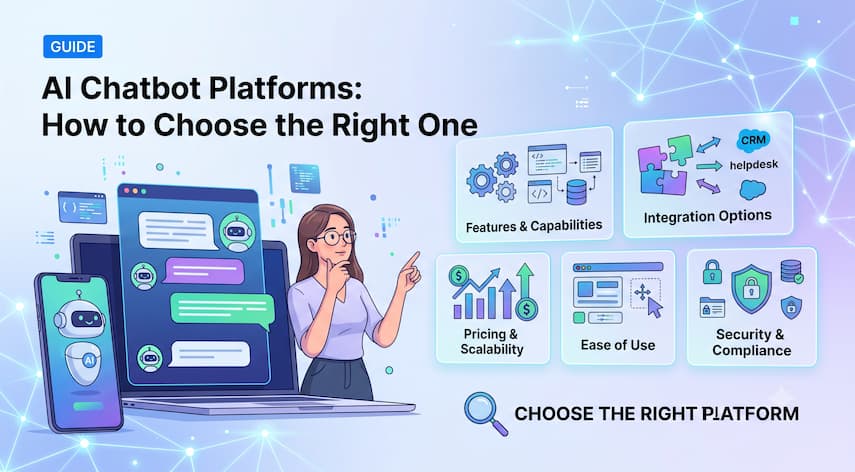
Every chatbot platform claims to be powered by AI now. That word alone doesn’t tell you much about whether a tool fits your website, your team’s technical skill, or your budget.
The real differences show up in how the platform is built: whether it’s a simple drag-and-drop builder, a marketing-focused automation tool, or a development platform meant for engineers. This guide breaks down those distinctions and gives you a practical way to evaluate any chatbot platform against your actual needs.
What Are AI Chatbot Platforms?
AI chatbot platforms are software tools that let businesses build and deploy chatbots powered by artificial intelligence to handle customer conversations, answer questions, and automate tasks across websites and other channels. They range from simple no-code builders to full development platforms, with features and pricing varying significantly by provider.
Most modern AI chatbot platforms use large language models and natural language processing to understand what a visitor is asking, rather than relying only on pre-written decision trees. This is the key difference from older, rule-based chatbots:
- Rule-based chatbots follow scripted decision trees and only respond to specific phrases or button clicks
- AI chatbots interpret natural language, handle varied phrasing, and can generate more flexible responses based on a knowledge base or connected data
Businesses use these platforms for customer support, lead generation, sales qualification, appointment scheduling, and general website assistance. Deployment channels commonly include websites, mobile apps, and messaging platforms, depending on the provider.
What Is an AI Chatbot Builder?
An AI chatbot builder is the interface used to design, configure, and launch a chatbot without necessarily writing code from scratch. Builders generally fall into three categories:
- Visual/no-code builders — Drag-and-drop interfaces where you design conversation flows, connect data sources, and publish a chatbot without writing code. These are aimed at marketers, support teams, and small business owners.
- Low-code builders — Visual tools that also allow custom scripting, API calls, or logic beyond the built-in drag-and-drop options. These suit teams with some technical resources but no dedicated development team.
- Developer-focused builders — Frameworks or SDKs that give engineers full control over conversation logic, integrations, and hosting. These require coding knowledge and are typically used by larger technical teams.
A visual chatbot builder specifically refers to the no-code category — the kind of tool where you can see and edit the conversation flow visually, without touching code.
What Is the Difference Between Chatbot Platforms and Chatbot Builders?
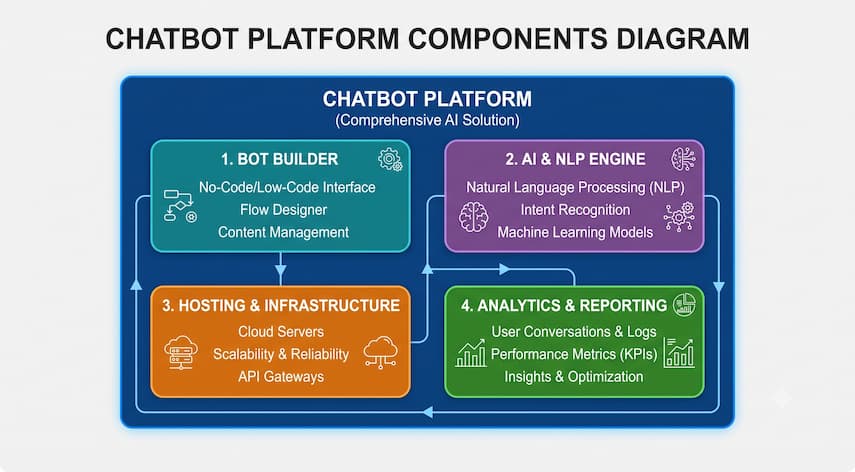
These terms are often used interchangeably, but they describe slightly different things.
- Chatbot platform typically refers to the full product — the AI engine, hosting, analytics, integrations, and management dashboard, all bundled together.
- Chatbot builder typically refers specifically to the design interface used to create the conversation flow within that platform.
In practice, most commercial products are both: a platform that includes a builder as one of its core components. The distinction matters mainly when comparing a full-service platform against a narrower tool that only provides the design interface and expects you to bring your own AI engine or hosting.
What Can AI Chatbot Platforms Do?
Capabilities vary by provider, but common functions include:
- Customer support — Answering frequently asked questions and resolving simple support issues automatically
- Lead generation — Capturing visitor information and qualifying interest before handing off to a sales team
- Sales qualification — Asking structured questions to identify serious buyers
- FAQ automation — Pulling answers from a connected knowledge base or help center
- Appointment or inquiry handling — Scheduling calls, demos, or service requests
- Product discovery — Helping visitors find relevant products or services based on their questions
- Marketing automation — Triggering follow-up messages or campaigns based on chatbot interactions
- Internal knowledge access — Helping employees find internal documentation or policies
- Human escalation — Routing complex conversations to a live agent when needed
- Data collection — Gathering structured information through conversational forms
- Workflow automation — Triggering actions in other connected systems based on conversation outcomes
Not every platform supports every capability. Confirm which of these matter most for your use case before assuming a given tool covers them.
What Are the Best AI Chatbot Platforms?
There’s no single “best” AI chatbot platform for every business, since the right choice depends heavily on your technical resources, website setup, and use case. Rather than naming one universal winner, it’s more useful to think in categories:
- Best for small businesses — Platforms with simple setup, transparent pricing, and minimal ongoing maintenance
- Best for website deployment — Platforms with strong widget customization and direct website integration
- Best for no-code users — Visual builders that don’t require any coding knowledge
- Best for advanced customization — Low-code or developer-focused platforms with API access
- Best for marketing automation — Platforms with strong CRM and campaign integrations
- Best for customer support — Platforms with robust knowledge-base connections and human handoff
- Best for developers — Platforms offering SDKs, APIs, and full conversation-logic control
- Best for enterprise use — Platforms with advanced security, permissions, and scalability features
Because specific platform features, pricing, and capabilities change frequently, verify current details directly on each provider’s official website before making a decision based on any particular claim.
Best AI Chatbot Builders for Websites
When evaluating a chatbot specifically for a website, prioritize different factors than you would for an internal tool or a messaging-app chatbot:
- Website integration — How easily the chatbot embeds into your existing site without conflicting with your design
- Branding — Whether you can customize colors, logo, tone, and widget placement
- Knowledge-base connection — Whether the chatbot can pull answers from your existing help content
- Lead capture — Whether the chatbot can collect and forward visitor information
- Human handoff — Whether a live agent can step in when the bot can’t help
- CRM integration — Whether conversations and leads sync automatically with your sales tools
- Analytics — Whether you can see conversation volume, common questions, and outcomes
- Conversation history — Whether past interactions are saved and accessible
- Mobile experience — Whether the widget works smoothly on mobile browsers
- Response quality — Whether the AI gives accurate, relevant answers based on your actual content
- Deployment control — Whether you can control when and where the chatbot appears on your site
A chatbot that scores well on AI response quality but poorly on website integration or branding can still hurt the visitor experience, so weigh both factors together.
Best Chatbot Builders for Small Businesses
Small businesses generally need a different balance of priorities than larger organizations:
- Ease of setup — Can the chatbot be configured and launched without a dedicated technical team?
- Cost — Is pricing predictable and reasonable relative to expected volume?
- Maintenance — How much ongoing effort does the chatbot require to stay accurate and useful?
- Automation — Does it genuinely reduce manual support or sales work?
- Integrations — Does it connect with the tools the business already uses, like email or a CRM?
- Support — Is help available if something breaks or needs adjustment?
- Scalability — Can the platform handle growth without a costly re-platforming later?
- Staff requirements — Does managing the chatbot require new hires or specialized skills?
For most small businesses, a no-code or low-code platform with predictable pricing tends to fit better than a developer-focused tool that requires ongoing engineering support.
Chatbot Automation Tools vs Chatbot Platforms
“Chatbot automation tools” often refers to the broader category of software that automates conversational tasks, which can include chatbot platforms but also encompasses adjacent tools like automated email sequences, workflow triggers, or marketing automation that isn’t conversational at all.
A chatbot platform is generally a subset of chatbot automation tools, specifically focused on real-time conversational interaction. When comparing options, check whether a tool is a true conversational chatbot platform or a broader automation tool that includes basic chat functionality as one feature among many.
Chatbot Development Platforms: Who Needs Them?
A chatbot development platform is designed for teams that need more control than a visual builder provides. These typically include:
- APIs — Programmatic access to build custom integrations
- SDKs — Software development kits for embedding chatbot functionality into custom applications
- Custom workflows — The ability to define conversation logic beyond built-in templates
- Data integrations — Direct connections to internal databases or proprietary systems
- Developer control — Full access to conversation logic, response generation, and error handling
- Deployment flexibility — Options to host the chatbot in a specific environment or infrastructure
Development platforms make sense for businesses with unique workflows, strict data requirements, or engineering resources available to build and maintain a custom solution. They’re generally unnecessary for businesses that just need a functional website chatbot quickly.
No-Code vs Low-Code vs Custom Chatbot Development
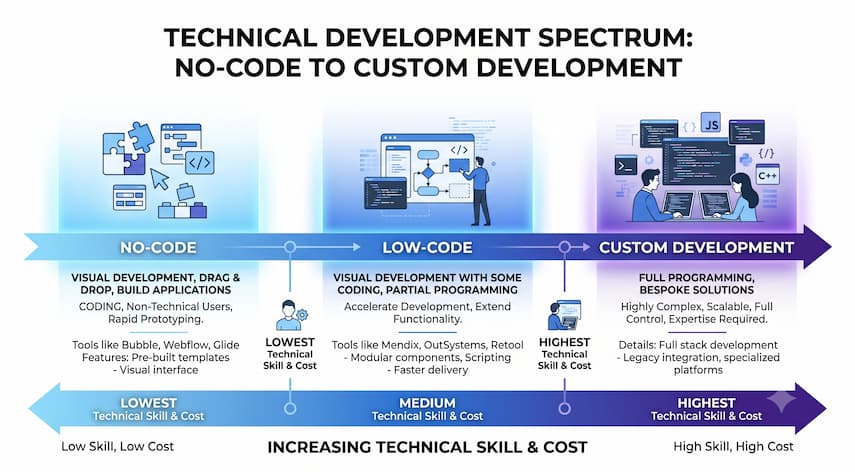
| Factor | No-Code | Low-Code | Custom Development |
|---|---|---|---|
| Technical skill required | None | Some scripting/API knowledge | Full development team |
| Setup time | Fast, often hours to days | Moderate, days to weeks | Longer, weeks to months |
| Customization | Limited to built-in options | Moderate, with custom logic | Extensive, fully tailored |
| Maintenance | Minimal | Occasional technical upkeep | Ongoing engineering resources |
| Cost | Generally lower, subscription-based | Moderate | Generally higher, includes development cost |
| Scalability | Good for straightforward use cases | Good for moderately complex needs | Best for highly specific or complex needs |
| Best use case | Small businesses, quick deployment | Growing businesses with some technical resources | Enterprises or unique workflow requirements |
Choosing the wrong tier is one of the most common mistakes businesses make — either overpaying for developer flexibility they don’t need, or hitting a wall with a no-code tool that can’t support a more complex workflow.
Key Features to Look for in an AI Chatbot Platform
Not every feature matters equally for every business. Evaluate based on your actual use case:
- AI response quality — Does it give accurate, relevant answers based on your content?
- Knowledge-base integration — Can it pull from your existing help articles or documentation?
- Website deployment — Is website embedding straightforward and customizable?
- CRM integrations — Does it connect with your sales and marketing tools?
- Analytics — Can you track performance and common visitor questions?
- Lead capture — Can it collect and route visitor information effectively?
- Human handoff — Can a live agent take over when needed?
- Workflow automation — Can it trigger actions in other connected systems?
- API access — Is there a way to extend functionality programmatically if needed later?
- Security — What data protection measures are in place?
- Permissions — Can you control who on your team can edit or view conversations?
- Multilingual support — Does it support the languages your customers use?
- Customization — Can you control tone, branding, and conversation flow?
- Scalability — Can it handle growth in conversation volume without major limitations?
How Much Do AI Chatbot Platforms Cost?
Pricing varies by plan and usage, and providers structure their pricing models differently. Rather than a single number, expect one or more of the following approaches:
- Free plans — Many platforms offer a limited free tier, often capped by conversation volume or features
- Subscription pricing — Flat monthly or annual fees, often tiered by feature set
- Usage-based pricing — Costs tied to conversation volume, messages sent, or AI processing
- Per-seat pricing — Additional costs for each team member with dashboard access
- Message limits — Plans that cap the number of conversations or messages before requiring an upgrade
- AI usage charges — Some platforms pass through underlying AI model costs based on usage
- Setup or development costs — Custom implementations, especially on development platforms, may involve upfront costs
- Integration costs — Some premium integrations may only be available on higher-tier plans
Because pricing models and tiers change frequently, check the provider’s current pricing page directly rather than relying on older comparisons. Additional integrations may require a higher-tier plan, and usage-based charges can add up quickly if conversation volume grows.
How to Choose the Right AI Chatbot Platform.
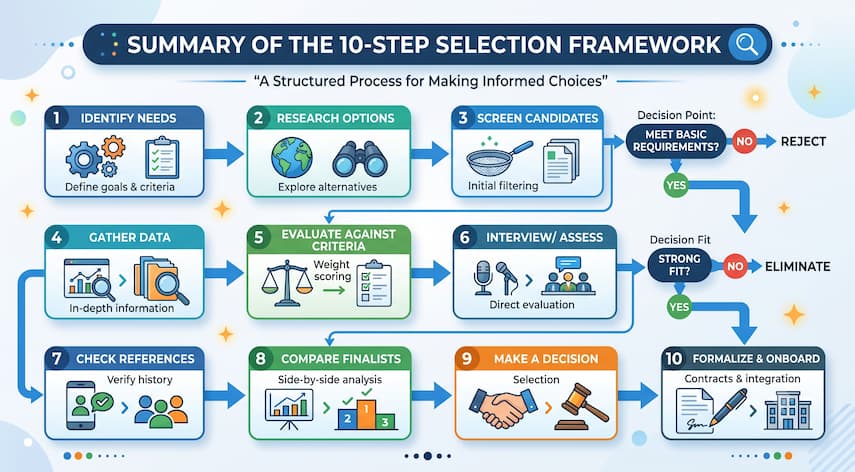
- Define your primary use case. Decide whether you need customer support, lead generation, sales qualification, or a mix.
- Assess your technical resources. Determine whether a no-code, low-code, or developer-focused platform fits your team.
- List required integrations. Identify the CRM, help desk, or other tools the chatbot needs to connect with.
- Check website compatibility. Confirm the widget integrates cleanly with your current site.
- Review analytics capabilities. Make sure you can measure whether the chatbot is actually working.
- Understand the full pricing structure. Look beyond the advertised starting price to usage limits and add-on costs.
- Test with real customer questions. Try the chatbot with the actual questions your customers ask, not just a demo script.
- Confirm human handoff options. Make sure complex conversations can reach a real person when needed.
- Evaluate security and data handling. Especially important if the chatbot will handle any sensitive customer information.
- Check scalability. Consider whether the platform can grow with your business without a disruptive switch later.
Common Mistakes When Choosing a Chatbot Platform
- Choosing based only on AI branding. Marketing language about “AI-powered” doesn’t guarantee response quality or fit for your use case.
- Ignoring integration requirements. A chatbot that doesn’t connect to your CRM or help desk creates extra manual work.
- Focusing only on monthly price. Usage-based charges and add-ons can make a “cheap” plan more expensive in practice.
- Not checking usage limits. Message caps can trigger unexpected upgrade costs as volume grows.
- Ignoring human handoff. A chatbot with no escalation path can frustrate customers with complex issues.
- Failing to test real customer questions. A polished demo doesn’t guarantee the bot handles your actual FAQs well.
- Not considering data or security requirements. Sensitive customer or business data needs appropriate protection, especially in regulated industries.
- Choosing a platform that’s too complex. Developer-focused tools can create unnecessary overhead for businesses that just need a simple website bot.
When Should a Business Use an AI Chatbot?
An AI chatbot isn’t always the right tool. Consider the alternatives before committing:
- A simple live chat system may be enough if your support volume is low and a human can realistically respond quickly
- A well-organized FAQ page may solve the problem if most visitor questions are static and don’t require personalization
- Human support may be essential for complex, sensitive, or high-stakes customer interactions where automation risks a poor experience
- Complex workflows may require custom development if your process doesn’t fit standard chatbot templates
- Sensitive data may require additional controls beyond what a general-purpose chatbot platform provides by default
A chatbot tends to add the most value when you have a genuine volume of repetitive questions or a clear automation opportunity — not simply because competitors have one.
Frequently Asked Questions
What are AI chatbot platforms?
AI chatbot platforms are software tools that let businesses build and deploy AI-powered chatbots to handle customer conversations, answer questions, and automate tasks. They typically include a design interface, an AI engine, hosting, and analytics, with capabilities varying significantly by provider.
What is an AI chatbot builder?
An AI chatbot builder is the interface used to design and configure a chatbot’s conversation flow. Builders range from no-code, visual drag-and-drop tools for non-technical users to low-code and developer-focused options that allow custom scripting and deeper technical control.
What is the best AI chatbot for a website?
There’s no single best option for every website, since the right fit depends on your branding needs, integration requirements, and technical resources. Prioritize platforms with strong website embedding, knowledge-base connection, lead capture, and human handoff rather than choosing based on marketing claims alone.
What is the difference between a chatbot builder and a chatbot development platform?
A chatbot builder is typically a visual, no-code or low-code interface for designing conversation flows quickly. A chatbot development platform gives engineers deeper control through APIs, SDKs, and custom logic, suited to businesses with unique workflows or dedicated technical teams.
Are AI chatbot platforms suitable for small businesses?
Many are, particularly no-code and low-code platforms designed for ease of setup and predictable pricing. Small businesses generally benefit most from tools that require minimal maintenance and integrate with existing systems, rather than developer-focused platforms that need ongoing technical support.
How much do AI chatbot platforms cost?
Pricing varies by plan and usage, often combining a subscription fee with usage-based charges for conversation volume or AI processing. Free tiers are common but usually limited. Check each provider’s current pricing page, since costs can change and vary significantly by feature tier.
Can I build a chatbot without any coding knowledge?
Yes, many no-code and visual chatbot builders are specifically designed for non-technical users. These tools let you design conversation flows, connect a knowledge base, and publish a chatbot through a drag-and-drop interface without writing code.
What integrations should I look for in a chatbot platform?
Prioritize integrations relevant to your workflow, such as your CRM, help desk, email marketing tool, or scheduling software. Confirm these integrations are available on your intended pricing tier, since some platforms restrict premium integrations to higher-cost plans.
Is an AI chatbot always better than a simple FAQ page or live chat?
Not necessarily. A well-organized FAQ page can resolve static, repetitive questions without any chatbot at all, and a simple live chat system may be sufficient for low support volume. An AI chatbot adds the most value when there’s genuine conversational complexity or volume to automate.
What should I check before switching chatbot platforms?
Confirm how conversation history, integrations, and analytics data transfer to the new platform, and check whether your website embed code needs updating. Also review the new platform’s pricing structure and usage limits to avoid unexpected costs after switching.
Conclusion
Choosing an AI chatbot platform comes down to matching the tool’s technical tier, features, and pricing model to your actual business needs — not to which product markets itself most aggressively as “AI-powered.” A no-code builder might be all a small business needs, while a growing company with complex workflows may need low-code flexibility or a full development platform.
Before committing to any platform, test it with your real customer questions, confirm the integrations you actually need, and get a clear picture of total cost beyond the advertised starting price. If you’re exploring how AI fits into your broader customer experience or automation strategy, it’s worth reviewing your options against your specific goals before making a final decision.

Mike Farrier is a seasoned technology journalist, digital trends researcher, and Senior Editor at Queknow. With over a decade of hands-on experience spanning web architecture, emerging tech, digital consumer products, and data-driven market insights, Mike bridges the gap between complex topics and actionable knowledge. He leads the editorial team to deliver rigorously fact-checked, up-to-date guides and comprehensive analysis across digital lifestyle, enterprise technology, and online business ecosystems. When not analyzing industry shifts, Mike actively tests consumer software and contributes to tech forums.
Recommended For You

Freelancing comes with a version of bookkeeping most employees never have to think about: tracking your own income, categorizing your
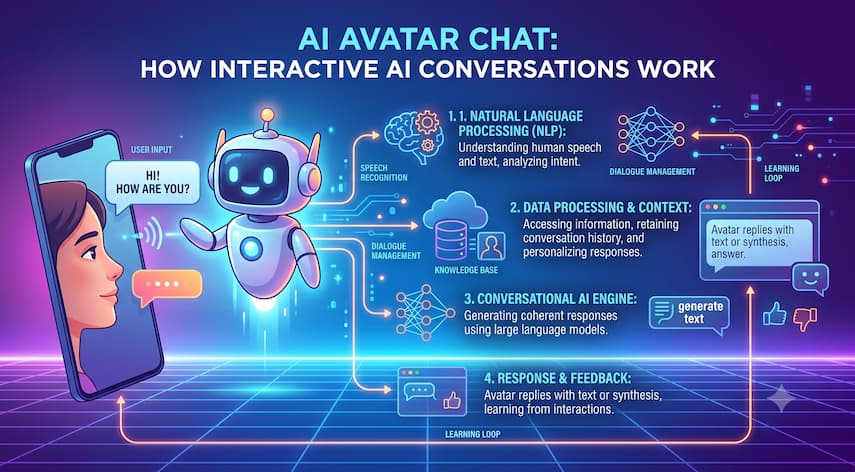
A chat window with a typing indicator used to be the standard for AI-powered customer interaction. Now, a growing number

An auction catalog tells you far more than what is for sale. If you know how to read it, it