CPA Accounting Software: What CPA Firms Should Look For
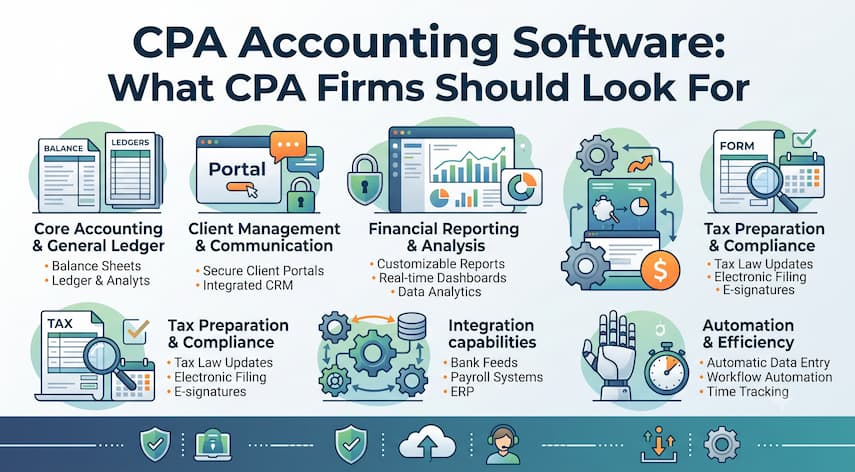
Choosing accounting software is rarely the hard part for a CPA firm. Choosing software that fits how the firm actually operates — client work, staff assignments, tax deadlines, and billing cycles — is where most firms get stuck.
A basic accounting platform can track transactions and generate financial statements. But a CPA firm also has to manage engagements, assign work to staff, track deadlines across dozens or hundreds of clients, communicate securely with clients, and bill accurately for time and services. Software that only handles the accounting side of the business leaves the rest of the practice running on spreadsheets, email threads, and manual reminders.
This Queknow guide walks through what CPA accounting software actually covers, how it differs from general accounting software, and how to evaluate options against your firm’s real workflow instead of a generic feature checklist.
What Is CPA Accounting Software?
CPA accounting software is a category of business software built to support the operational needs of an accounting or CPA firm, not just the accounting needs of a single business. It typically supports one or more of the following:
- Core accounting and bookkeeping functions
- Client and engagement management
- Task and project workflows
- Time tracking and billing
- Document management and client portals
- Reporting on both client finances and firm performance
Some platforms combine several of these functions into one system. Others focus on a single layer, such as practice management or tax workflow, and are designed to integrate with other tools a firm already uses. Features vary by provider and plan, so it’s worth confirming exactly what’s included before assuming a platform covers a given function.
What Software Do CPA Firms Use?
Most CPA firms rely on a combination of software rather than a single all-in-one system. Common categories include:
- Accounting software — for bookkeeping, general ledger, and financial statement work, either for the firm’s own books or on behalf of clients
- Practice-management software — for tracking engagements, deadlines, staff workload, and client communication
- Tax software — for preparing and filing individual and business tax returns
- Bookkeeping software — used for client write-up work and monthly close processes
- Project or workflow management tools — for assigning and tracking tasks across engagements
- Document management systems — for organizing client files, source documents, and workpapers
- Client portals — for secure document exchange and e-signatures
- Billing and payment tools — for invoicing and collecting client payments
- Reporting and analytics tools — for firm-level visibility into productivity and profitability
Depending on the provider, some of these functions are bundled into a single platform. In other cases, firms connect several specialized tools through integrations. Neither approach is automatically “better” — the right setup depends on firm size, service mix, and how much the team wants to manage in one place versus several.
CPA Accounting Software vs General Accounting Software
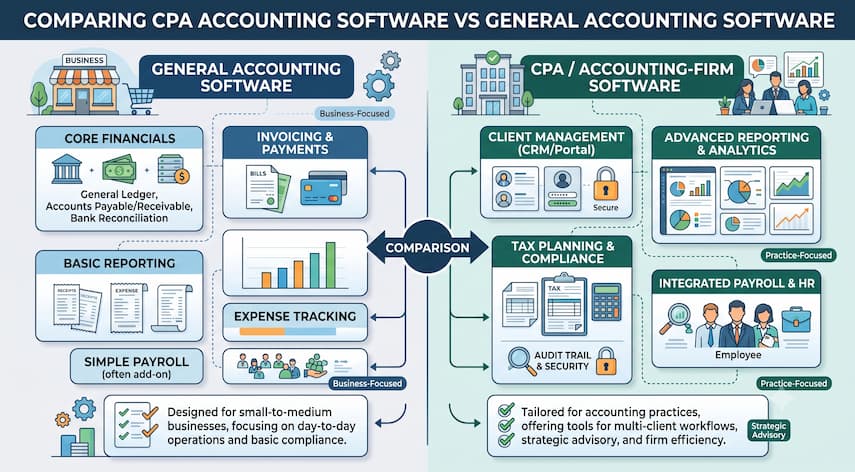
General accounting software is built primarily for a single business managing its own books. CPA accounting software is built for a firm managing accounting work across many clients, often with multiple staff members involved in each engagement.
| Capability | General Accounting Software | CPA / Accounting-Firm Software |
|---|---|---|
| Core accounting | Yes | Often, or connects to accounting tools |
| Multi-client management | Limited or not designed for this | Built for managing many clients |
| Staff task assignment | Rarely included | Common in practice-management tools |
| Deadline and workflow tracking | Minimal | Central feature |
| Time tracking for billing | Sometimes basic | Typically more robust |
| Client communication tools | Limited | Often includes portals or messaging |
| Tax workflow support | Not typically included | Frequently integrates with tax software |
| Staff permission controls | Basic | Usually more granular |
| Reporting on firm performance | Not applicable | Common, in addition to client reporting |
This comparison reflects general patterns across the software category. Specific capabilities vary by product and plan — confirm details directly with each vendor before purchasing.
This comparison reflects general patterns. Specific capabilities vary by product and plan, so firms should confirm details directly with each vendor.
Key Features to Look for in CPA Accounting Software
Not every platform includes every feature below, and few firms need all of them. Use this list as an evaluation checklist rather than an assumption of what any single product provides.
- Accounting and bookkeeping — ledger management, reconciliation, and financial reporting
- Practice management — engagement tracking, deadlines, and staff workload visibility
- Workflow automation — recurring task templates for common engagement types
- Task and project management — assigning, tracking, and reviewing work
- Client management — centralized client records and communication history
- Time tracking — capturing billable and non-billable hours accurately
- Billing and invoicing — generating invoices tied to time or fixed fees
- Tax workflow support — status tracking for returns in preparation or review
- Document management — secure storage and organization of client files
- Client portals — secure upload, download, and e-signature capability
- Reporting — both client-facing financial reports and internal firm metrics
- User permissions — role-based access to sensitive client data
- Security — encryption, access logs, and data protection controls
- Mobile or cloud accessibility — where relevant to how the team works
Availability of any given feature can depend on the software edition or subscription tier, so it’s worth checking a vendor’s current documentation rather than assuming parity across plans.
Why Practice Management Matters for CPA Firms
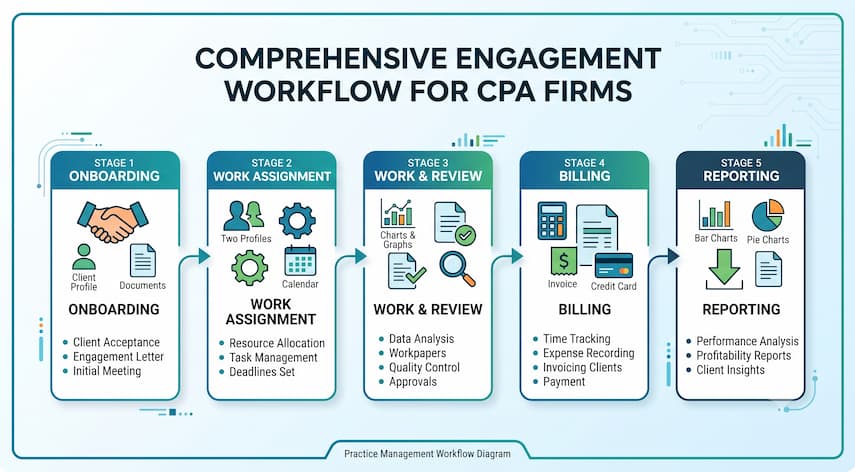
Accounting functions handle the numbers. Practice management handles the operational layer that keeps engagements moving — and it’s often the piece that’s missing when a firm outgrows spreadsheets and shared inboxes.
Practice-management capabilities typically address:
- Deadlines — tracking filing and delivery dates across many clients at once
- Work allocation — assigning tasks based on staff capacity and expertise
- Staff capacity — visibility into who is overloaded and who has room for more work
- Client communication — a record of requests, responses, and outstanding items
- Engagement management — scope, status, and progress for each client relationship
- Recurring workflows — templates for monthly close, quarterly filings, or annual returns
- Review processes — routing work through preparer and reviewer stages
- Billing — connecting time spent to what gets invoiced
- Reporting — firm-level insight into productivity, realization, and profitability
A firm that skips this layer often finds that its core accounting software works fine, but the surrounding operations — who’s doing what, and by when — stay dependent on manual tracking.
Accounting Management Software for Growing Firms
As a firm adds staff and clients, the requirements for its software tend to shift. What worked for a two-person practice often breaks down at ten people, and breaks down again at thirty.
Growing firms typically need to plan for:
- More employees requiring role-based access and task visibility
- More clients requiring standardized onboarding and engagement setup
- More complex workflows spanning multiple service lines
- Delegation of work across preparers, reviewers, and managers
- Granular permissions to protect sensitive client data
- Reporting that shows performance across teams, not just individual staff
- Standardized processes that reduce dependence on any one person’s memory
- Automation for repetitive, deadline-driven tasks
- Scalability — a platform that doesn’t require a full re-platforming every time the firm adds headcount
Firms sometimes delay this evaluation until growth has already created bottlenecks. Assessing scalability before signing a contract can reduce the need for a disruptive switch later.
Bookkeeping Practice Management Software
Bookkeeping-focused practices have workflow needs that overlap with — but aren’t identical to — those of full-service CPA firms. Recurring monthly close cycles, client transaction categorization, and reconciliation reviews are the backbone of the work.
Bookkeeping firms often benefit from practice-management capabilities layered on top of core accounting software, including:
- Recurring task templates for monthly close cycles
- Client-by-client status tracking across a portfolio of accounts
- Deadline tracking tied to each client’s close schedule
- Time tracking to support accurate billing
- Client communication tools for requesting missing documents or approvals
Some accounting platforms include lightweight practice-management features out of the box. Others require a separate tool connected through an integration. Which approach makes sense depends on how many clients the firm manages and how standardized its processes already are.
Project Management Software for Accounting Firms
Accounting work is project-based, even when it doesn’t feel that way. A tax return, a client onboarding process, or a monthly bookkeeping cycle all have a defined scope, a sequence of steps, and a deadline.
Project-management functionality can support:
- Tax engagements — tracking each return through preparation, review, and filing
- Client onboarding — a repeatable checklist for new client setup
- Bookkeeping cycles — recurring monthly or quarterly close tasks
- Advisory projects — one-off engagements with custom milestones
- Internal initiatives — firm operations projects outside client work
- Deadline management — visibility into what’s due and what’s at risk
- Staff assignments — clear ownership for each task or engagement
Generic project-management tools (built for software teams or marketing agencies, for example) can technically be adapted for accounting work, but they usually lack accounting-specific templates, tax-deadline awareness, and client-engagement structures. Accounting-practice-specific systems are typically built around the engagement types and compliance deadlines a CPA firm actually deals with.
Tax Programs for Accountants and CPA Firms
Tax software occupies its own place in a firm’s technology stack. Most accounting or practice-management platforms are not designed to replace dedicated tax preparation software, and it’s worth being cautious about any vendor that implies otherwise.
Instead, the more common setup involves:
- Tax preparation software handling the actual return preparation and e-filing
- Accounting or bookkeeping software providing the underlying financial data
- Practice-management tools tracking the status of each return through the workflow
- Integrations connecting these systems so data and status updates flow between them
When evaluating a platform, it’s worth asking specifically whether — and how — it integrates with the tax software the firm already uses, rather than assuming compatibility.
How to Choose CPA Firm Accounting Software
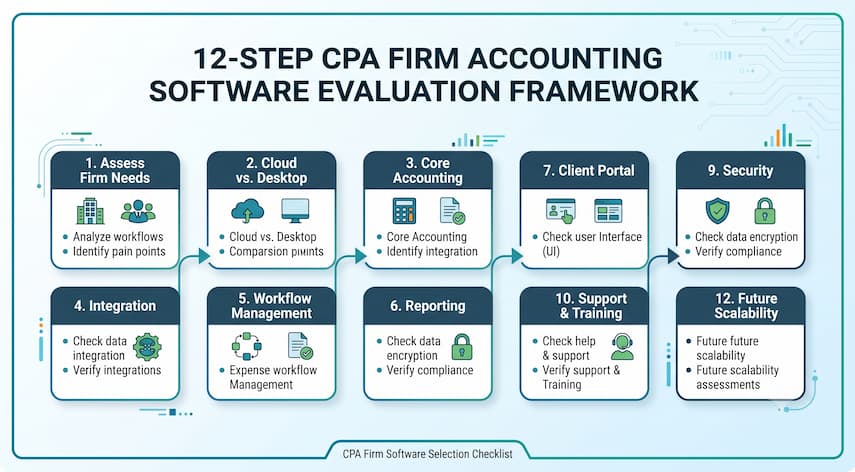
A structured evaluation process reduces the risk of choosing software that looks good in a demo but doesn’t fit daily operations.
- Define your firm’s workflows. Map out how engagements move from intake to delivery today.
- Identify required features. Separate “must-have” from “nice-to-have” based on your actual workflow, not a generic feature list.
- Map integrations. List the tax, payroll, payment, and document tools the new platform needs to connect with.
- Assess security and permissions. Confirm how client data is protected and how access is controlled by role.
- Evaluate scalability. Ask how the platform handles growth in staff, clients, and service lines.
- Consider implementation. Understand what setup, configuration, and data migration will involve.
- Calculate total cost of ownership. Include subscription fees, add-ons, training, and migration — not just the list price.
- Test real workflows. Run an actual engagement type through a trial or demo environment.
- Evaluate support. Check response times, support channels, and available documentation.
- Review contract and data considerations. Understand data ownership, export options, and cancellation terms.
- Assess user adoption. Consider how easily your team will actually adopt the new system.
- Compare vendors against defined requirements. Score each option against the same criteria rather than judging them individually.
Common Mistakes When Choosing Accounting Software for Accounting Firms
- Choosing based only on accounting features, without evaluating the practice-management layer the firm actually needs day to day.
- Ignoring workflow requirements, resulting in software that handles the numbers but not the operational process around them.
- Overlooking integrations, which can create manual data re-entry between systems.
- Failing to assess scalability, leading to a disruptive switch once the firm grows past the platform’s limits.
- Underestimating training time, which delays adoption and reduces early return on the investment.
- Ignoring user permissions, which can create unnecessary exposure to sensitive client data.
- Not testing real workflows, relying instead on a generic sales demo that doesn’t reflect actual firm processes.
- Choosing software without considering the client experience, such as how clients will upload documents or sign engagement letters.
Questions to Ask Before Buying CPA Accounting Software
- Which core accounting and practice-management features are included in our specific plan?
- Does the platform integrate with our current tax software, payroll system, and payment processor?
- What security certifications or protections does the platform maintain, and where is data stored?
- What does data migration from our current system typically involve?
- What training and onboarding support is included, and what costs extra?
- What support channels are available, and what are typical response times?
- How is pricing structured — per user, per client, or by tiered plan?
- Can we add or remove users easily as staffing changes?
- How does the platform handle scalability as our firm grows?
- Can we customize workflows, templates, and permissions to match our processes?
- What are the contract terms, and how easily can we export our data if we switch providers later?
- What does implementation typically look like, and how long does it take?
How Much Does CPA Accounting Software Cost?
Pricing structures vary significantly by vendor, and this guide won’t invent specific figures. In general, CPA accounting software tends to follow one or more of these models:
- Subscription pricing, billed monthly or annually
- Per-user pricing, where cost scales with the number of staff accounts
- Tiered plans, where higher tiers unlock more features or higher usage limits
- Add-on modules, priced separately for functions like advanced reporting or client portals
- Integration costs, which may apply to connect third-party tax, payroll, or payment tools
Beyond the subscription itself, firms should budget for potential additional costs, including:
- Implementation and setup
- Data migration from a prior system
- Staff training
- Additional user seats as the firm grows
- Premium or add-on modules
- Ongoing support, depending on the plan
- Storage beyond included limits, if applicable
Total cost depends heavily on firm size, feature requirements, and the specific vendor and plan selected. Requesting a detailed quote based on your firm’s actual user count and feature needs is the most reliable way to understand real cost. If you’re also weighing accounting education costs for your staff, Queknow’s guide on how much an online accounting course costs breaks down similar pricing factors.
Best Accounting Software for CPA Firms: How to Define “Best”
There’s no single accounting platform that’s objectively best for every CPA firm. The right answer depends on factors specific to each practice:
- Firm size — a solo practitioner and a 40-person firm have very different needs
- Service mix — tax-heavy, bookkeeping-heavy, or full-service firms prioritize different features
- Workflow complexity — the number of steps and reviewers involved in a typical engagement
- Budget — what the firm can reasonably allocate to software
- Existing software stack — what’s already in place and needs to integrate
- Integration needs — which systems the new platform must connect with
- Staff size — how many people need access, and at what permission level
- Client requirements — expectations around portals, communication, and document exchange
- Growth plans — whether the firm expects to add staff or clients significantly in the near term
Rather than looking for a universal “best,” firms get more useful results by building a scored comparison across these criteria for each vendor under consideration.
Should You Use CPA Accounting Software Consultants?
Some firms bring in a software consultant to help with selection or implementation, while others handle the process internally. Neither approach is automatically the right call — it depends on the firm’s internal capacity and the complexity of the transition.
A consultant may be useful for:
- Software selection, especially when comparing several unfamiliar platforms
- Workflow mapping, translating current processes into system requirements
- Implementation, managing the technical rollout
- Migration, moving data from a legacy system without loss or errors
- Integration planning, connecting multiple systems correctly
- Training, helping staff adopt new tools efficiently — worth pairing with broader staff development, such as Queknow’s overview of accounting courses online free for onboarding newer team members
- Process optimization, redesigning workflows rather than just replicating old ones in new software
Consultants are not always necessary, particularly for smaller firms making straightforward transitions. They tend to add the most value when a firm is migrating complex data, coordinating multiple integrations, or lacks internal bandwidth to manage the process alongside regular client work.
FAQs
What is CPA accounting software?
CPA accounting software refers to tools built to support the operational needs of an accounting firm, not just bookkeeping for a single business. It typically covers accounting, client and engagement management, workflow tracking, billing, and reporting, either in one platform or through connected systems.
What software do CPA firms use?
Most CPA firms use a combination of accounting software, practice-management tools, tax preparation software, document management systems, and client portals. Some firms consolidate several of these functions into one platform, while others connect specialized tools through integrations based on their specific workflow needs.
Is CPA accounting software different from regular accounting software?
Yes. General accounting software is typically built for a single business managing its own books. CPA accounting software is designed for firms managing many clients at once, with added features for staff task assignment, deadline tracking, and client communication that general tools usually lack.
Does a CPA firm need practice-management software?
Many firms benefit from practice-management capabilities once they’re coordinating multiple staff members and client deadlines. Solo practitioners with a small client base may need less of this functionality than growing firms managing dozens of engagements simultaneously across a team.
Can accounting software handle tax workflows?
Most accounting or practice-management platforms don’t replace dedicated tax preparation software. Instead, they typically track the status of tax engagements and integrate with tax software that handles the actual return preparation and filing. Confirm integration details directly with each vendor.
What software is useful for bookkeeping practices?
Bookkeeping-focused firms often use core accounting software paired with practice-management features for recurring monthly close cycles, client status tracking, and deadline management. The right combination depends on how many clients the practice manages and how standardized its processes already are.
How important are integrations when choosing accounting software?
Integrations are a significant factor because they determine whether data moves automatically between the firm’s tax software, payroll systems, document management, and accounting platform. Poor integration support often results in manual data re-entry and a higher risk of errors.
How much does CPA accounting software typically cost?
Costs vary by vendor and typically follow subscription, per-user, or tiered pricing models, sometimes with add-on modules for extra features. Beyond the subscription fee, firms should budget for implementation, training, migration, and potential integration costs, which can add meaningfully to the total.
When should a CPA firm use a software consultant?
A consultant can help when a firm is comparing unfamiliar platforms, migrating complex data, coordinating several integrations, or lacks internal bandwidth to manage a transition alongside client work. Smaller firms making straightforward switches may not need one.
What should a firm test before purchasing accounting software?
Firms should run an actual engagement type — such as a client onboarding process or a monthly close cycle — through a trial or demo environment. This reveals whether the software fits real workflows better than a generic sales demonstration can.
Conclusion
Choosing accounting software for a CPA firm comes down to matching the platform to how the firm actually works — not just to how well it handles core accounting functions. Workflow management, integrations, security, and scalability often matter as much as the accounting features themselves, especially as a firm grows.
Firms that map their own processes first, test real workflows before committing, and compare vendors against clearly defined criteria are in a much stronger position to make a decision that holds up over time. If you’re currently evaluating options, take the time to compare solutions against your firm’s specific requirements, and don’t hesitate to speak with a software specialist if you need help working through the details.

Mike Farrier is a seasoned technology journalist, digital trends researcher, and Senior Editor at Queknow. With over a decade of hands-on experience spanning web architecture, emerging tech, digital consumer products, and data-driven market insights, Mike bridges the gap between complex topics and actionable knowledge. He leads the editorial team to deliver rigorously fact-checked, up-to-date guides and comprehensive analysis across digital lifestyle, enterprise technology, and online business ecosystems. When not analyzing industry shifts, Mike actively tests consumer software and contributes to tech forums.
Recommended For You

Freelancing comes with a version of bookkeeping most employees never have to think about: tracking your own income, categorizing your

A chat window with a typing indicator used to be the standard for AI-powered customer interaction. Now, a growing number

An auction catalog tells you far more than what is for sale. If you know how to read it, it