Understanding PS2 BIOS: A Comprehensive Guide
The PlayStation 2, or PS2, remains a beloved console among gamers. Its vast library of games and innovative features left a lasting impact. But what if you want to relive those classic games on modern devices? This is where PS2 BIOS comes into play.
PS2 BIOS is a crucial component for emulating PS2 games on a PC or other devices. It acts as the bridge between the emulator and the game software. Without it, emulators like PCSX2 and AetherSX2 cannot function properly.
Understanding PS2 BIOS is essential for anyone interested in emulation. It involves more than just downloading a file. Legal and ethical considerations are important when obtaining BIOS files. Extracting BIOS from your own PS2 console is the recommended method.
This guide will explore everything you need to know about PS2 BIOS. From its role in emulation to how to obtain it legally, we’ve got you covered. Whether you’re a seasoned gamer or new to emulation, this comprehensive guide will enhance your understanding. Let’s dive into the world of PS2 BIOS and unlock the potential of PS2 emulation.
What Is PS2 BIOS? The Basics Explained
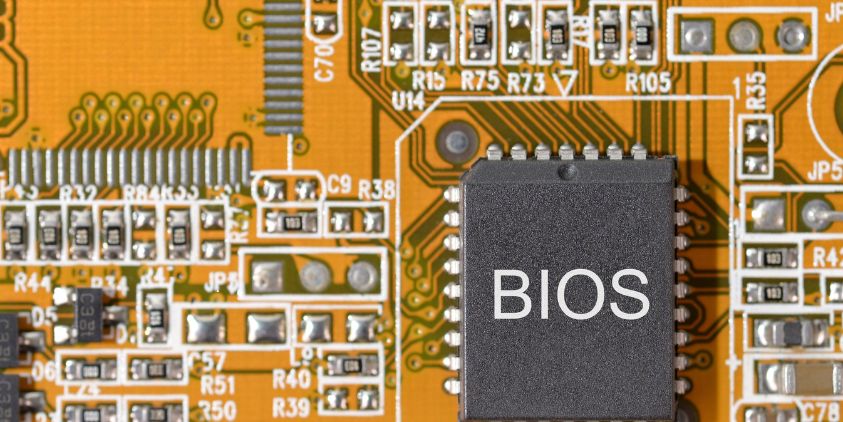
The PS2 BIOS stands for the Basic Input/Output System of the PlayStation 2. It serves as the primary operating system of the console. A small yet essential piece of software, the BIOS manages hardware initialization.
In emulation, the BIOS file is critical for mimicking the PS2’s hardware environment. Without it, emulators cannot replicate the PS2’s unique functionalities. This includes features like memory card management and game loading.
Here’s what the PS2 BIOS does:
- Initializes hardware components
- Loads the operating system
- Manages firmware settings
PS2 BIOS files usually have specific region codes. These include SCPH-XXXXX.bin, indicating the version number and region. Each version aligns with a geographic area, affecting game compatibility.
BIOS files themselves are stored within the console’s ROM chip. This storage medium is non-volatile, ensuring the BIOS can perform its essential functions every time the console boots up.
While it may seem complex, the BIOS is essentially the spine of the PS2’s booting process. Understanding its role can enhance your emulation experience and lead to more successful game launches. This foundational knowledge is essential for anyone diving into PS2 emulation. Let’s explore how the BIOS fits into the broader context of emulation and gaming.
The Role of BIOS in PlayStation 2 and Emulation
The BIOS plays a central role in the functionality of the PlayStation 2. It bridges the hardware and software, enabling seamless communication between the two. For gamers, this ensures that games boot correctly every single time.
In emulation, the PS2 BIOS transforms computers into virtual PS2 consoles. This transformation is crucial for authentic gaming experiences on non-native hardware. Emulators rely heavily on BIOS files for accuracy and performance.
Here are key roles of the PS2 BIOS in emulation:
- Acts as the console’s original operating environment
- Provides essential startup routines
- Enables game loading and execution
The emulation process replicates the PS2 hardware environment, making the BIOS indispensable. Without a proper BIOS file, the emulator cannot accurately portray the real console. This leads to glitches, crashes, or even non-functional games.
BIOS files are thus essential for maintaining the integrity and authenticity of the gaming experience. In essence, the BIOS is the cornerstone of successful PS2 game emulation. Understanding its pivotal role is vital for any emulation setup. As you explore emulation further, recognizing the importance of the BIOS will enhance your gaming adventures.
Different PS2 BIOS Versions and Regions
The PS2 BIOS is not a one-size-fits-all. It varies based on region and specific console models. These variations are essential for the correct functioning of games from different parts of the world.
Different regions have distinct BIOS versions, such as:
- American (USA)
- European (PAL)
- Japanese (NTSC-J)
Each version corresponds to a specific region’s television standards and gaming formats. This means games designed for one region may require a BIOS from the same region for proper emulation.
by Jon Tyson (https://unsplash.com/@jontyson)
It’s important to match the BIOS version with the region of the game for compatibility. Failing to do so can lead to gameplay issues or outright unplayable games.
Furthermore, each BIOS version contains unique regional settings and language options. These details ensure the console operates as intended for local users. Emulators need these distinctions to accurately replicate the original gaming environment.
The difference in BIOS versions highlights the complexity and diversity of the PS2’s global impact. For emulation enthusiasts, understanding these differences is crucial. It’s the key to unlocking a rich library of international titles. Thus, knowing your BIOS version is a step toward maximizing your emulation setup.
Why Emulators Need PS2 BIOS Files
Emulators aim to replicate the PlayStation 2’s hardware, but they need PS2 BIOS files to do so accurately. The BIOS acts as a bridge between the emulator software and the PS2 games.
Without the BIOS, an emulator cannot mimic the PS2’s environment effectively. It is a critical component for initializing hardware features and loading games. Emulation requires this accurate start-up process to run PS2 games smoothly.
The PS2 BIOS handles vital functions such as:
- Booting the emulator
- Managing memory and resources
- Initializing hardware settings
These tasks ensure the emulator can provide an authentic gaming experience. A BIOS file manages the interaction between game software and the virtual hardware environment.
In essence, the PS2 BIOS enables emulators to function as close to the original console as possible. This accuracy supports better game compatibility and enhanced performance. Without BIOS files, running PS2 games with any semblance of authenticity becomes almost impossible.
Legal Considerations: How to Get PS2 BIOS Safely
Obtaining a PS2 BIOS file legally is crucial for ethical emulation. While tempting, downloading from unauthorized sources is illegal and against Sony’s terms.
The legal way to get a PS2 BIOS is by extracting it from your own PlayStation 2 console. This ensures you are in compliance with intellectual property laws.
Here’s a quick list of basic steps for legal BIOS extraction:
- Own an original PlayStation 2 console.
- Use licensed software to dump the BIOS.
- Store the BIOS file for personal use only.
Engaging in these steps confirms that you respect legal boundaries and support ethical gaming practices. It’s important to remember that distributing BIOS files is illegal.
When planning to extract a BIOS file, you need to prepare appropriate tools. Essential items include a USB drive and specific software designed for BIOS dumping. Carefully follow instructions provided by these applications to ensure safe extraction.
Consider the following points to ensure a smooth process:
- Follow software guidelines strictly.
- Ensure all hardware is compatible.
- Perform backups to avoid data loss.
Legal compliance ensures a clear conscience while enjoying emulation. Avoid online offers of free BIOS downloads, as they carry legal risks.
By adhering to these guidelines, you can fully enjoy PS2 emulation without the fear of legal repercussions. Always prioritize legality and safety in your emulation journey.
How to Extract PS2 BIOS from Your Console
Extracting the PS2 BIOS from your console involves several detailed steps. The process is technical but rewarding for ethical emulation enthusiasts.
First, gather the necessary materials, including your PS2 console, a memory card, and a USB drive. You’ll also need a PS2 memory card reader for your PC.
Prepare your PlayStation 2 by connecting it to a television. Make sure all components are in working order before proceeding with the extraction process.
To begin the BIOS extraction, ensure your USB drive is formatted to FAT32. This format is compatible with the PS2 system.
Next, you’ll need a software program designed for BIOS dumping. A popular choice is Free McBoot combined with a utility like uLaunchELF.
Here’s a brief list of steps to set up Free McBoot:
- Install Free McBoot on your memory card.
- Connect the memory card to your PS2.
- Boot your PS2 with Free McBoot.
Once Free McBoot is running, you can use uLaunchELF to access the PS2’s file system. This allows you to navigate to the BIOS files stored in the console.
After locating the BIOS files, copy them to the connected USB drive. Ensure that the USB drive is securely attached and has enough space.
by Shubham Dhage (https://unsplash.com/@theshubhamdhage)
Completing this process gives you a legally obtained BIOS. It’s important for personal use in emulation and ensures compliance with copyright laws.
Remember to handle your console and components with care. Mishandling could lead to data loss or damage to your console.
By following these steps, you can extract your PS2 BIOS safely and prepare for a seamless emulation experience on your preferred platform.
Setting Up PS2 BIOS in PCSX2 (Windows/Mac/Linux)
Setting up the PS2 BIOS in PCSX2 is crucial for emulating PS2 games. This guide will cover steps for Windows, Mac, and Linux.
First, download and install PCSX2. Visit the PCSX2 website to find the version compatible with your operating system.
Once installed, launch PCSX2. The first-time configuration wizard will guide you through the setup process, including BIOS configuration.
by Shubham Dhage (https://unsplash.com/@theshubhamdhage)
Begin by selecting the BIOS folder. This folder should contain the extracted PS2 BIOS files from your console.
On Windows, place the BIOS file in Documents\PCSX2\bios. Mac users should place it in Library/Application Support/PCSX2/bios.
For Linux, navigate to ~/.config/PCSX2/bios/. Ensure the BIOS file is properly named (e.g., SCPH-XXXXX.bin).
Within the PCSX2 setup wizard, you will need to specify the correct BIOS version. This choice depends on the region of the games you wish to play.
Here’s a checklist for BIOS selection:
- Confirm the correct BIOS region (e.g., USA, Europe, or Japan).
- Ensure the BIOS files appear in the selection menu.
- Select the desired BIOS version and click ‘Finish.’
After configuration, test the emulator by running a PS2 game. The game should load if the BIOS is set up correctly.
It’s essential to verify that your graphics, audio, and controller settings are optimized. This step ensures the best performance and experience.
If issues arise, recheck the BIOS file path and ensure no discrepancies. Misconfigurations often cause common emulation errors.
By following these steps, you’ll create a platform for enjoying classic PS2 games on your modern system. This setup enhances your gaming nostalgia through improved graphics and functionality.
Setting Up PS2 BIOS in AetherSX2 (Android)
AetherSX2 allows you to enjoy PS2 games on Android devices. Setting up the PS2 BIOS is essential for optimal emulation.
Begin by downloading AetherSX2 from the Google Play Store. Make sure your device meets the app’s hardware requirements for smooth gameplay.
After installation, open the app. The next step involves configuring the BIOS. Navigate to the ‘Settings’ tab in the app’s main menu.
Locate the ‘BIOS’ section within the settings. This section will enable you to input the needed BIOS file.
Transfer the PS2 BIOS file from your computer to your Android device. Use a USB cable or a file transfer app for this task.
Place the BIOS file in a known directory on your device’s storage, such as AetherSX2/bios. Ensure the file retains its original name (e.g., SCPH-XXXXX.bin).
Here’s a quick checklist for the setup:
- Ensure the BIOS file is correctly named and located.
- Verify file integrity to prevent emulation issues.
- Choose the appropriate BIOS region for your games.
In the AetherSX2 BIOS configuration, select the correct file from your storage. Save the settings before returning to the main menu.
Test the setup by running a PS2 game. Proper BIOS configuration will allow games to boot successfully and function smoothly.
These steps will transform your Android device into a portable gaming console, bringing classic PS2 experiences into your hands. Enjoy the nostalgia with enhanced graphics and mobile convenience.
Troubleshooting Common PS2 BIOS Issues
Running into issues with PS2 BIOS can be frustrating. However, most problems have simple solutions that can restore functionality quickly.
Common BIOS errors include games not loading or the emulator crashing unexpectedly. These issues often stem from incorrect BIOS file configurations.
Ensure your BIOS file is in the correct directory. Incorrect file paths can prevent the emulator from accessing necessary data.
by Joshua Hoehne (https://unsplash.com/@joshua_hoehne)
Verify that the BIOS file matches your game region. Incompatibility between game and BIOS regions can lead to loading issues.
If the emulator still misbehaves, double-check the BIOS filename. Any accidental renaming could disrupt the emulation process.
Here’s a quick checklist to troubleshoot BIOS issues:
- Verify the BIOS file’s location.
- Check file and region compatibility.
- Ensure correct emulator settings.
If problems persist, consider using forums or community resources. These platforms offer valuable advice and solutions from experienced users.
With proper troubleshooting, most BIOS-related problems can be resolved. This ensures a seamless gaming experience and optimal performance.
Frequently Asked Questions About PS2 BIOS
What Is a PS2 BIOS File?
A PS2 BIOS file is essential for emulating PlayStation 2 games on various platforms. It allows emulators to mimic PS2 hardware effectively.
Is Downloading PS2 BIOS Legal?
Downloading PS2 BIOS from unauthorized sites is illegal. It’s against Sony’s terms and violates copyright laws. Always opt for legal methods.
How Can I Obtain a PS2 BIOS Legally?
To obtain a PS2 BIOS legally, you must extract it from your own PS2 console. This maintains the legality of your emulation setup.
Are There Different Versions of PS2 BIOS?
Yes, PS2 BIOS files vary by region. There are American, European, and Japanese versions, each catering to its own regional software.
Why Do Emulators Require BIOS Files?
BIOS files are crucial for emulators. They enable accurate hardware emulation and ensure game compatibility across various systems.
What Should I Do If My Game Won’t Load?
If your game won’t load, check your BIOS file’s compatibility. Ensure it’s the correct region and configuration for your game and emulator.
Can I Use One BIOS File for All Games?
Not always. Some games may require specific versions of the BIOS for optimum compatibility and performance.
List of Key Points to Remember:
- Legal BIOS extraction is crucial.
- Ensure BIOS and game region compatibility.
- BIOS files are necessary for accurate emulation.
Useful Tips for Emulation Enthusiasts:
- Always back up your BIOS files.
- Stay updated with the latest emulator versions.
- Consult community forums for troubleshooting assistance.
PS2 BIOS and Game Compatibility: What You Need to Know
The PS2 BIOS plays a fundamental role in game compatibility for emulators. Without it, emulators cannot accurately mirror the console’s hardware environment. This can lead to games failing to run or exhibiting errors.
Different BIOS versions affect game compatibility. Titles released in various regions may require specific BIOS files to function correctly. These files replicate the regional hardware needed by each game.
Game compatibility is also influenced by how up-to-date the emulator is. Emulator updates often optimize support for different BIOS versions, improving game performance and reducing glitches.
For optimal performance, use the appropriate BIOS for your game’s region. Consider the following factors when checking compatibility:
- Match the BIOS version with your game’s region.
- Update your emulator regularly for improved support.
- Consult emulator-specific forums for compatibility advice.
Understanding these aspects can significantly enhance your emulation experience. Ensure that both BIOS files and emulators are properly aligned. This minimizes issues and maximizes game performance.
The Importance of BIOS for Game Preservation and Emulation
The BIOS is pivotal in preserving classic games through emulation. It acts as the connective tissue between old games and modern technology. Without it, many classic titles would fade into obscurity.
Emulation with BIOS files ensures the authentic replication of original gaming experiences. These files are crucial in maintaining the integrity of game mechanics and visuals, which is vital for historical accuracy.
Preserving games involves more than just keeping the code alive. It requires re-creating the exact conditions under which they were originally played. This is where the BIOS becomes invaluable.
Benefits of using BIOS in game preservation include:
- Accurate reproduction of gameplay mechanics.
- Preservation of original audio and visuals.
- Access to a vast library of vintage games.
By understanding BIOS in the context of game preservation, we appreciate its role in maintaining gaming history. BIOS files help bridge the past with the present, ensuring that cherished games can be enjoyed by future generations.
Tips for Safe and Ethical Emulation
Emulation offers a fantastic way to relive old gaming experiences. However, navigating the legal landscape of emulation can be tricky. Ensuring that you practice safe and ethical emulation is crucial.
Firstly, always use BIOS files extracted from consoles you own. This practice adheres to legal guidelines and supports ethical gaming. Avoid downloading BIOS files from unauthorized or illegal sources.
Secondly, be aware of copyright laws. While emulation itself is not illegal, distributing copyrighted BIOS files can lead to legal trouble. Respecting intellectual property rights benefits both gamers and developers.
Consider these tips to ensure a safe emulation experience:
- Use legal methods to extract BIOS from your console.
- Avoid downloading BIOS files from the internet.
- Support game developers by purchasing classic games legally, if available.
By following these guidelines, you can enjoy emulation without infringing upon intellectual property. Safe and ethical practices ensure the longevity and respectability of the emulation community.
Conclusion
The world of PS2 BIOS and emulation is ever-evolving. As technology advances, emulators become more sophisticated, offering enhanced gaming experiences. This progress helps bridge the gap between past and present gaming.
Preserving classic games remains a central focus for many. BIOS files play a crucial role in ensuring these titles are accurately emulated. They allow new generations of gamers to experience beloved classics.
Looking ahead, the community’s commitment to ethical practices will shape emulation’s future. By respecting intellectual property and prioritizing legality, emulation can continue to thrive as a vital part of gaming history.

Lareal Young is a legal professional committed to making the law more accessible to the public. With deep knowledge of legislation and legal systems, she provides clear, insightful commentary on legal developments and public rights, helping individuals understand and navigate the complexities of everyday legal matters.
Recommended For You
In the landscape of peer-to-peer file sharing, 1337x stands as one of the most resilient and community-driven platforms available. However,

Artificial intelligence is not just for enterprise companies with big technology budgets. AI ML development company is already being leveraged

Using AI to deliver personalised customer experiences at scale.Harnessing AI for personalized customer experiences on a large scale. The expectations