AI Chat App Free Download for Android: What to Know Before You Install One
Type “AI chat app” into the Google Play Store and you’ll get more results than you can reasonably compare. Some are official apps from well-known AI companies. Others are unofficial wrappers, rebranded clones, or apps that advertise “free” access and then gate almost everything behind a subscription.
This guide isn’t another list of app names. It’s a practical way to understand what you’re actually getting when you download a free AI chat app, how to avoid installing something misleading, and how to pick the right type of app for what you actually want to do. This Queknow guide focuses on the mobile-app side of the story; if you’re evaluating AI chat for a business website instead, see our guide to AI chatbot platforms.
What Is an AI Chat App for Android?
An AI chat app for Android is a mobile application that lets you have text or voice conversations with an AI assistant for tasks like answering questions, writing, or research. Many are free to download, but “free download” doesn’t always mean unlimited free use — some features may require a subscription or account.
These apps generally work by sending your message to an AI model — either running on a remote server or, less commonly, partly on your device — and returning a generated response. Most function similarly to a chatbot you’d use on a website, just packaged as a mobile app with features like push notifications, voice input, and offline-friendly interfaces layered on top.
Can You Download an AI Chat App for Android for Free?
Yes, many AI chat apps are free to download from the Google Play Store. That doesn’t automatically mean every feature inside the app is free to use. It’s worth understanding the common pricing structures before you assume “free” means “no cost, ever”:
- Free download, free basic usage — The app itself and a core set of features cost nothing
- Freemium model — Free to download and use at a basic level, with premium features locked behind a subscription
- Usage limits — Free tiers often cap the number of messages, conversations, or advanced features you can use per day or month
- In-app purchases — Some apps sell one-time features or credits rather than a recurring subscription
- Free trial periods — Full access for a limited time, followed by a required subscription to continue
- Account requirements — Some free tiers require creating an account, even if no payment is involved
Before assuming an app is genuinely free for your intended use, check its Google Play listing and in-app pricing details directly, since these terms can change and vary significantly between apps.
What Can an AI Chat App Do on Android?
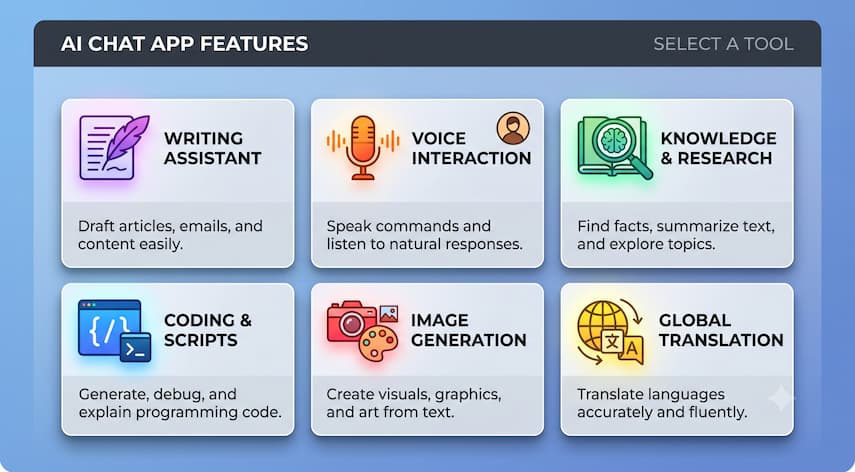
Capabilities vary significantly by app, so don’t assume every AI chat app offers every feature below. Common use cases include:
- Answering questions — General knowledge, explanations, and quick lookups
- Writing — Drafting emails, messages, or other text content
- Summarizing — Condensing longer text or documents into key points
- Brainstorming — Generating ideas for projects, content, or problem-solving
- Translation — Converting text between languages
- Research assistance — Helping organize or explain information on a topic, including studying for something like the material covered in Queknow’s AI accounting courses guide
- Coding — Assisting with code snippets, debugging, or explanations, in apps that support it
- Voice interaction — Talking to the app instead of typing, where supported, a format explored more fully in Queknow’s guide to AI avatar chat
- Image-related capabilities — Generating or analyzing images, in apps that offer this feature
- Productivity — Task lists, reminders, or note organization, depending on the app
Check each app’s specific feature list before downloading if you have a particular use case in mind, since capability sets differ widely even among apps that look similar in the Play Store.
What Are the Best AI Chat Apps for Android?
There’s no single “best” AI chat app for every Android user, and this guide won’t declare an unsupported universal winner. Instead, it helps to think in terms of what you’re optimizing for:
- Best for general AI chat — A well-known, officially published app with broad question-answering capability
- Best for productivity — An app with strong task management, note-taking, or scheduling integration
- Best for research — An app with strong summarization and source-referencing features
- Best for writing — An app tuned for drafting and editing text
- Best for voice interaction — An app with reliable speech recognition and natural-sounding voice responses
- Best for privacy or offline use — An app that clearly documents on-device processing or minimal data collection, where verified
A handful of official AI chat apps from major AI companies — including OpenAI’s ChatGPT app, Google’s Gemini app, and Microsoft’s Copilot app — are publicly available on the Google Play Store and represent well-established, officially published options. Beyond these, the landscape includes many third-party apps with widely varying quality, so verify current features, developer identity, and pricing directly on each app’s official Play Store listing before installing.
| App Category | Best For | Free Access | Android | Offline | Premium Option |
|---|---|---|---|---|---|
| Official general-purpose AI apps (e.g., major AI company apps) | Broad AI chat, writing, research | Varies by app and plan | Yes | Varies, typically limited | Common, varies by provider |
| Productivity-focused AI apps | Task management, notes | Varies | Yes | Not clearly stated, varies | Common |
| Voice-focused AI apps | Spoken conversation | Varies | Yes | Limited | Common |
| Lightweight/”mini” AI apps | Simple, low-resource chat | Varies | Yes | Sometimes, varies by app | Varies |
| On-device/offline-focused AI apps | Privacy-conscious or low-connectivity use | Varies | Yes | More likely, but capability varies | Varies |
This table reflects general category patterns rather than specific verified products. Confirm free access, offline functionality, and premium pricing directly on each app’s current Play Store listing before downloading.
Are There Free AI Chat Apps for Android With No Subscription?
Some apps offer meaningful functionality without ever requiring a subscription, though the extent of “meaningful” varies. It helps to distinguish between:
- Free access with no premium tier — Some apps, particularly smaller or open-source projects, don’t offer a paid plan at all
- Limited free access — Usable for free within certain limits, with an optional paid upgrade
- Optional premium plans — A free tier that’s genuinely functional, with premium features as an enhancement rather than a requirement
- Open-source or community options — Some AI chat apps are built on open-source models and may not involve any company-run subscription, though these often require more technical setup
If avoiding subscriptions entirely is a priority, check the app’s pricing page and Play Store listing for explicit confirmation rather than assuming based on the “free” label alone.
What About Offline AI Chat Apps for Android?
Offline or on-device AI is possible on some Android apps, but it’s not universal, and capability varies significantly.
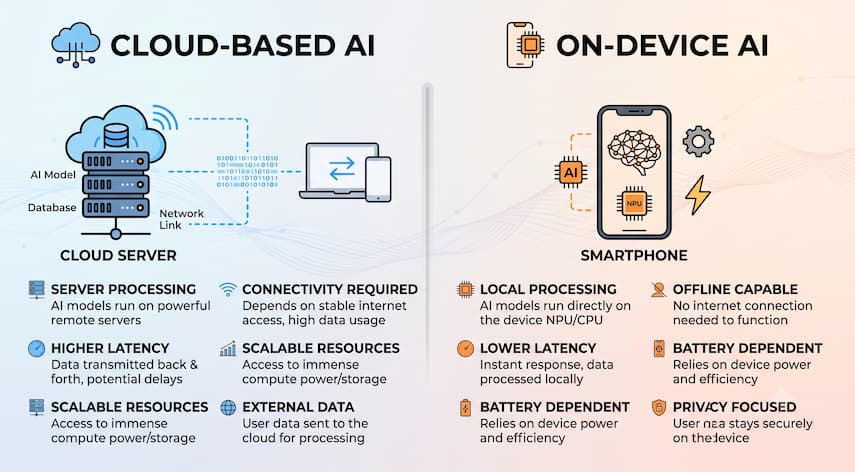
Cloud-based AI processes your messages on remote servers and typically requires an internet connection. Most well-known AI chat apps work this way, since larger, more capable AI models generally run on powerful remote infrastructure rather than on a phone.
On-device or offline AI processes some or all of the conversation locally on your Android device, without sending data to a remote server for that portion of the interaction. This approach involves real trade-offs:
- Device performance — On-device AI models require sufficient processing power, which can affect app responsiveness on older or lower-end phones
- Storage requirements — Local AI models take up storage space, sometimes substantial amounts
- Battery consumption — Running AI processing on-device can use more battery than sending requests to a server
- Model size and capability — On-device models are often smaller and less capable than the largest cloud-based models
- Privacy considerations — Keeping processing on-device can reduce the amount of data sent to external servers, though this depends on the specific app’s design
- Internet dependency — True offline apps reduce reliance on connectivity, which matters in areas with limited signal
- Update requirements — On-device models may need periodic downloads to stay current, which requires connectivity at some point
Don’t assume any given AI chat app works fully offline unless that’s explicitly and clearly stated in its official description. Many apps advertised as having “offline” features only support this for specific functions, not the full conversational experience.
How to Choose the Right AI Chat App for Android
- Identify your primary use case. Decide whether you mainly need general chat, writing help, research support, or voice interaction.
- Check what’s actually free. Look at the specific usage limits and premium features before assuming full functionality is included.
- Confirm official developer status. Verify the app is published by a legitimate, identifiable developer or company.
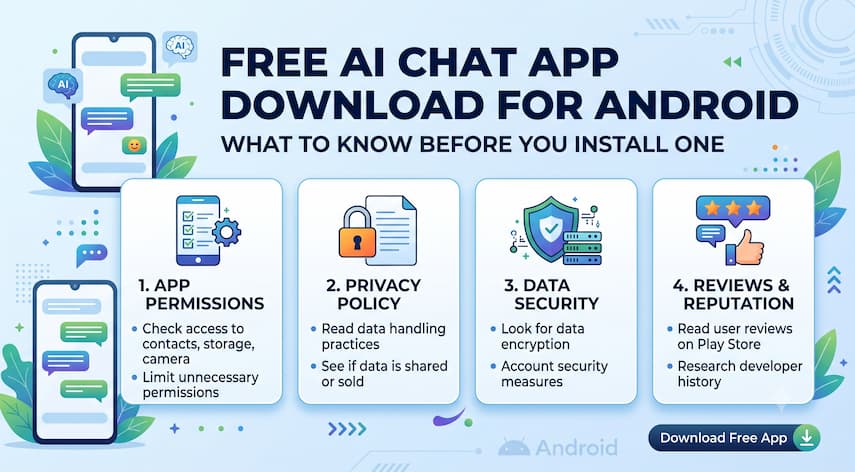
- Review required permissions. Check whether requested permissions make sense for the app’s stated functionality.
- Check the privacy policy. Look for clear information about what data is collected and how it’s used.
- Decide if offline access matters to you. If so, verify the app’s offline capability explicitly rather than assuming.
- Check device compatibility. Confirm the app supports your Android version and has reasonable storage and performance requirements.
- Review recent update activity. Apps that haven’t been updated in a long time may have unresolved issues or reduced compatibility.
- Read reviews as a supporting signal, not a guarantee. Reviews can highlight real problems, but they shouldn’t be your only research step.
How to Safely Download an AI Chat App
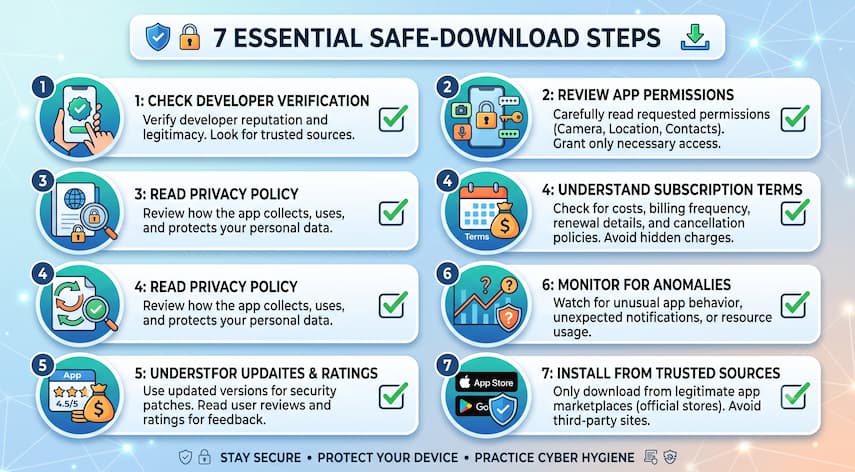
- Verify the official developer. Check the developer name listed on the Play Store page against the company’s official website.
- Prefer legitimate distribution channels. Download through the Google Play Store rather than third-party app files when possible.
- Review permissions before installing. Be cautious of apps requesting access unrelated to their core function, like unnecessary contacts or location access.
- Check privacy information. Review the app’s privacy policy and the Play Store’s data-safety section.
- Review subscription terms. Understand exactly what triggers a charge and how to cancel before starting a free trial.
- Check recent update history. Recent, regular updates are generally a positive sign of active maintenance.
- Avoid suspicious clones. Watch for apps using near-identical names or logos to well-known AI products without being the official app.
AI Chatbot Apps vs Using a Chatbot in a Mobile Browser
| Factor | Dedicated App | Mobile Browser |
|---|---|---|
| Convenience | Quick access from home screen | Requires opening a browser and navigating to the site |
| Notifications | Often supported | Generally not supported |
| Voice access | Frequently built in | Depends on the website’s features |
| Device integration | May integrate with device features like sharing or widgets | Limited integration |
| Updates | Requires app updates through the Play Store | Updates automatically since it’s browser-based |
| Storage | Uses device storage for the app | Minimal device storage impact |
| Privacy | Depends on app-specific data practices and permissions | Depends on the website’s data practices; no extra app permissions involved |
| Flexibility | Tied to one app’s interface and features | Easier to switch between different AI tools without installing anything |
Neither option is universally better. A dedicated app tends to be more convenient for regular use, while a browser-based chatbot avoids extra permissions and storage use if you only need occasional access. This trade-off mirrors the broader personalization-versus-convenience discussion in Queknow’s guide on AI transforming personalized customer experiences.
What Should You Know Before Using AI on Your Phone?
- Accuracy limitations — AI chat apps can generate incorrect or outdated information, so verify anything important through a reliable source
- Privacy — Consider what you’re entering into the chat, since conversations may be stored or used to improve the service, depending on the app
- Sensitive information — Avoid entering sensitive financial, medical, legal, or personal information unless you’ve confirmed how the app handles that data
- Hallucinations — AI-generated answers can sound confident while being wrong, particularly for niche or highly specific questions
- Account security — If the app requires an account, use a strong, unique password and enable available security features
- Data handling — Review what data the app collects, how long it’s retained, and whether it’s shared with third parties
- Connectivity — Most AI chat apps need an internet connection for full functionality, even if some offline features exist
Common Mistakes When Downloading AI Apps
- Installing an unofficial clone. Apps mimicking a well-known AI product’s name or icon aren’t necessarily the real thing.
- Ignoring developer information. Skipping the developer name check makes it easier to install something misleading.
- Assuming “free download” means unlimited free use. Many apps gate core features behind a subscription after a trial period.
- Overlooking subscription terms. Free trials that auto-renew into paid subscriptions catch many users off guard.
- Granting unnecessary permissions. Approving access unrelated to the app’s function increases privacy risk without adding value.
- Using outdated apps. Apps without recent updates may have security issues or reduced compatibility with newer Android versions.
Frequently Asked Questions
What is an AI chat app for Android?
An AI chat app for Android is a mobile application that lets you converse with an AI assistant through text or voice for tasks like answering questions, writing, or research. Most connect to a cloud-based AI model, though some offer limited on-device processing.
Can I download an AI chat app for Android for free?
Yes, many AI chat apps are free to download from the Google Play Store. However, free download doesn’t always mean unlimited free use — check each app’s specific usage limits, premium features, and subscription terms before assuming full functionality is included at no cost.
Are there offline AI chat apps for Android?
Some apps offer on-device or offline AI processing, but capability varies and isn’t universal. On-device models are typically smaller and less capable than cloud-based ones. Verify an app’s specific offline functionality explicitly rather than assuming based on general marketing claims.
Is the free version of an AI chat app actually unlimited?
Usually not entirely. Most free tiers include usage limits, such as a capped number of daily messages or restricted access to advanced features. Check the app’s official pricing details to understand exactly what’s included before relying on the free tier for regular use.
How do I know if an AI chat app is official or a clone?
Check the developer name listed on the Play Store page against the official company’s website, and look for consistent branding and recent update activity. Be cautious of apps using near-identical names or logos to well-known AI products without matching developer information.
What is a “mini AI app”?
“Mini AI app” generally refers to a lightweight AI application designed to use fewer device resources, offer a more compact interface, or provide a simplified feature set compared to larger, full-featured AI apps. The term isn’t tied to one specific product.
Is the “AI Chat GPT” app on Android the official ChatGPT app?
Not necessarily. Some apps use “GPT” or “ChatGPT-style” branding without being the official OpenAI app. Check the developer name on the Play Store listing to confirm whether you’re installing an official app or an unrelated third-party product using similar terminology.
Do AI chat apps require an internet connection?
Most do, since they typically rely on cloud-based AI models that process requests on remote servers. Some apps offer limited offline features, but full conversational capability generally requires connectivity unless the app explicitly documents comprehensive on-device processing.
What permissions should I check before installing an AI chat app?
Review whether requested permissions make sense for the app’s stated function. A basic text-chat app generally shouldn’t need access to contacts, location, or camera unless those features are directly relevant to its advertised capabilities.
Which type of AI chat app is right for me?
It depends on your primary use case. General questions and writing help suit a broad-purpose app, voice-focused tasks benefit from apps with strong speech features, and privacy-conscious or low-connectivity users may prioritize apps with verified offline capability.
Conclusion
Downloading an AI chat app for Android is simple, but choosing the right one takes a bit more care. “Free download” is just the starting point — what matters more is understanding the actual usage limits, verifying the developer is legitimate, and matching the app’s features to what you actually plan to use it for.
Before installing anything, check the official Play Store listing, review the permissions and privacy policy, and confirm pricing details directly rather than relying on assumptions. If you’re exploring how AI tools fit into your broader work or business needs, Queknow’s 90-day AI strategy roadmap for SMBs is a useful next read before settling on a specific app.

Mike Farrier is a seasoned technology journalist, digital trends researcher, and Senior Editor at Queknow. With over a decade of hands-on experience spanning web architecture, emerging tech, digital consumer products, and data-driven market insights, Mike bridges the gap between complex topics and actionable knowledge. He leads the editorial team to deliver rigorously fact-checked, up-to-date guides and comprehensive analysis across digital lifestyle, enterprise technology, and online business ecosystems. When not analyzing industry shifts, Mike actively tests consumer software and contributes to tech forums.
Recommended For You

Freelancing comes with a version of bookkeeping most employees never have to think about: tracking your own income, categorizing your
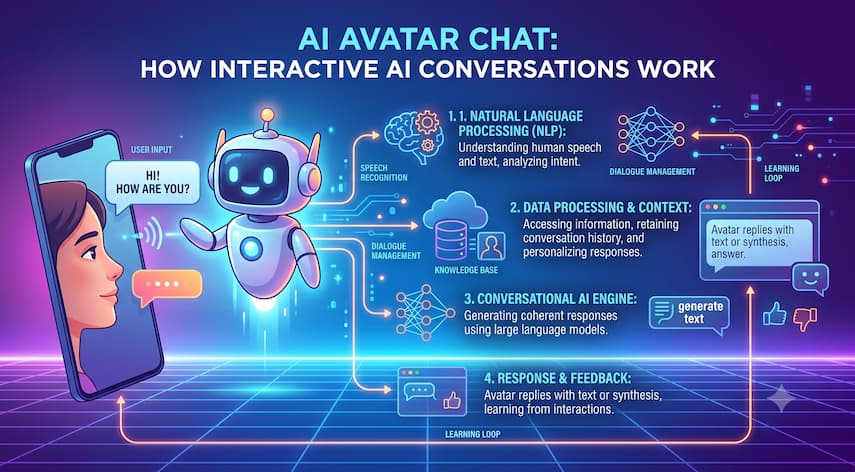
A chat window with a typing indicator used to be the standard for AI-powered customer interaction. Now, a growing number

An auction catalog tells you far more than what is for sale. If you know how to read it, it